
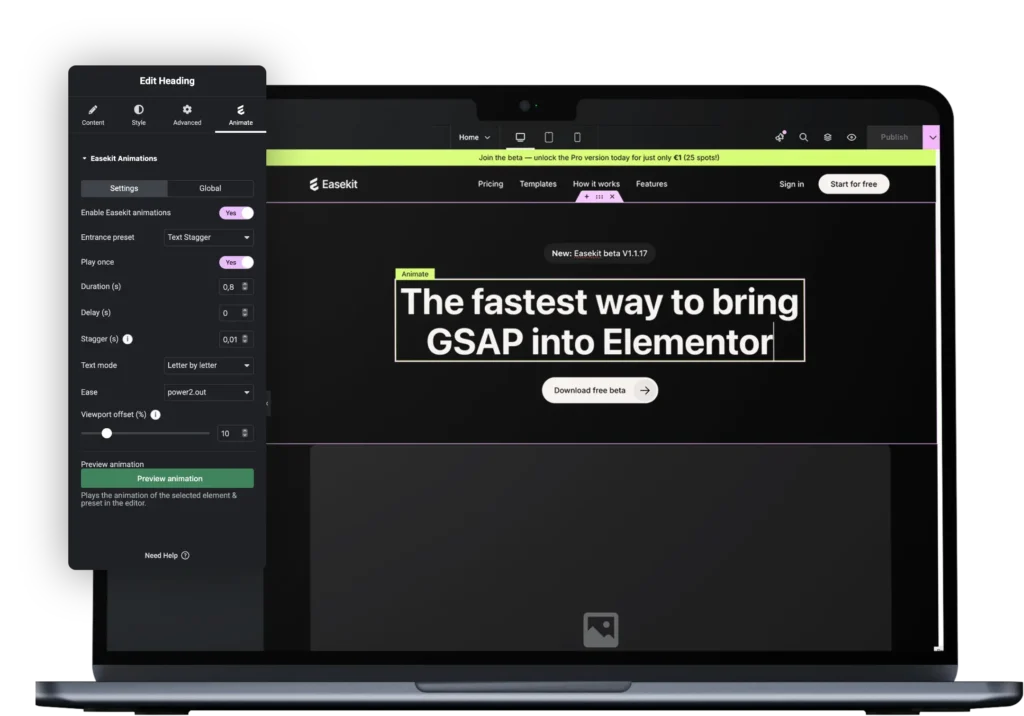
You want dynamic, smooth animations that make your WordPress websites stand out, but writing GSAP code is time-consuming, technical, and not what you signed up for.


EaseKit lets you add scroll, hover, or load-based animations to Elementor widgets, all with an intuitive visual editor. Under the hood? Real GSAP code. That means pixel-perfect motion, smooth playback, and zero performance trade-offs.
Reveal headlines on scroll, fade, or type in.
20+ more text animations
Zoom, rotate, or stagger images visually.
16+ more image animations
Bounce, scale, or animate buttons on hover.
Easekit is a lightweight WordPress plugin that bridges the gap between GSAP and Elementor. It allows you to apply high-quality, production-ready GSAP animations to Elementor elements without writing JavaScript. Instead of working with timelines, triggers, and custom scripts, you select from ready-to-use animation templates that are optimized for real-world websites. The focus is on speed, performance, and consistency rather than visual gimmicks.
Easekit is designed for Elementor users who care about motion design but don’t want to maintain custom animation code. This includes freelancers, agencies, and in-house teams building marketing websites, landing pages, and brand-driven platforms. It is especially valuable if you ship sites frequently, work with clients, or want consistent animation behavior across multiple projects.
No. Easekit abstracts GSAP’s complexity into structured templates. You don’t need to understand timelines, ScrollTrigger, or JavaScript syntax. That said, having basic animation intuition helps you choose the right template. Easekit gives you GSAP’s power without the learning curve or maintenance overhead.
Most Elementor animation solutions are either too basic (CSS-only effects) or too complex (custom JS per page). Easekit solves this by offering a middle ground: professional-grade GSAP animations that are easy to apply, consistent across pages, and safe to use on production websites. It eliminates copy-paste scripts, broken animations after updates, and inconsistent behavior between breakpoints.
Easekit is intentionally opinionated:
It uses GSAP and CSS only , not mixed animation libraries
It focuses on real UX animations, not decorative effects
It avoids visual clutter and excessive settings
It prioritizes performance and maintainability
Very little. Easekit only loads GSAP when animations are actually used and avoids unnecessary DOM manipulation. There are no heavy UI layers, no runtime animation builders, and no inline script spam. Animations are executed efficiently and follow GSAP best practices, making Easekit suitable for client and high-traffic websites.
Your website will remain fully functional. Content, layout, and structure are unaffected. Only the animations themselves will stop running. Easekit does not lock content, inject shortcodes, or create dependencies that break your site.
Yes. Easekit is fully compatible with Elementor v4. The plugin is built on top of Elementor’s core rendering and DOM structure, not on deprecated APIs or legacy animation features. Because of this, Easekit continues to work reliably as Elementor evolves, including the architectural changes introduced in version 4.
Yes. If Easekit doesn’t meet your expectations, you can request a full refund within 30 days of purchase. This applies to all paid licenses, including beta access. The refund policy is intentionally simple to remove any risk from trying Easekit in a real project. You can test the plugin, use it in production, and evaluate whether it fits your workflow. If it doesn’t, you can request a refund within 30 days and receive your money back in full.


“Easekit feels like a missing layer in Elementor, making GSAP animations finally usable.”
Download A lightweight GSAP plugin designed for Elementor.
 WordPress plugin
 Elementor


